

Spark CRM is built around several key modules that work together to manage your ecommerce business. This guide provides an overview of each module and how they connect.
Main Modules
Customers
The Customers module is your central customer database.
Key features:
- Complete customer profiles with contact information
- Email, phone, and address validation status
- Customer lifecycle tracking
- Order and transaction history
- Notes and activity logs
- Blacklist management for fraud prevention
Use it to:
- View and manage customer information
- Track customer purchase history
- Add notes about customer interactions
- Blacklist problematic customers by email, phone, IP address and/or shipping address
(Risk flags such as VPN, TOR, proxy and datacenter are shown automatically from the order’s IP data and cannot be set by hand.)
Orders
The Orders module handles all your sales transactions.
Key features:
- Full order lifecycle management
- Order status tracking
- Quality assurance (QA) workflow
- Affiliate attribution
- Transaction history per order
- Fulfillment tracking
Use it to:
- View and manage orders
- Process refunds
- Track order fulfillment
- Review flagged orders in QA queue
Transactions
The Transactions module tracks all payment activity.
Key features:
- Complete transaction history
- Status tracking (completed, declined, refunded, etc.)
- Decline reason mapping
- Transaction notes via the REST API (in the app, notes are added on the order or customer record)
- Gateway response details
Use it to:
- View payment history
- Investigate declined transactions
- Track refunds and chargebacks
- Analyze payment performance
Subscriptions
The Subscriptions module manages recurring billing.
Key features:
- Subscription lifecycle management
- Automated rebilling
- Retry logic for failed payments
- Billing cycle tracking
- Subscription calendar
Use it to:
- View active subscriptions
- Manage subscription status
- Track rebilling success rates
- Cancel or modify subscriptions
Campaigns
The Campaigns module powers your sales funnels.
Key features:
- Multi-product campaigns
- Affiliate tracking and management
- Upsell and cross-sell offers
- Auto-responder email sequences
- Geographic and currency restrictions
- Decline salvage profiles
Use it to:
- Create and manage sales campaigns
- Configure checkout flows
- Set up affiliate partnerships
- Define retry rules for declined payments
Products
The Products module manages your catalog.
Key features:
- Product catalog with pricing, cost and inventory tracking (products created in the app are physical; the digital and subscription product types can only be set through the API)
- Product variants exist in the data model and are populated automatically when you sync a Shopify or WooCommerce store, but there is no screen in the app for creating, editing or viewing them
- Fulfillment configuration
- Tax and shipping settings
Use it to:
- Add and manage products
- Set pricing and costs
- Configure fulfillment methods
- Track inventory levels
Payment Modules
Gateways
The Gateways module connects your payment processors.
Key features:
- Multiple gateway support (Authorize.net, Stripe, etc.)
- Credential management
- Connection testing
- Gateway-specific configuration
Use it to:
- Add payment processor accounts
- Configure gateway credentials
- Test gateway connections
- Manage multiple processors
Decline Mappings
The Decline Mappings module standardizes decline reasons.
Key features:
- Map gateway-specific decline codes
- Standardized decline categories
- Decline analytics
Use it to:
- Understand why transactions fail
- Present consistent decline wording to customers and API integrators
- Analyze decline patterns
(To choose which declines are retried, edit the excluded decline codes on a Salvage profile.)
Salvage
The Salvage module recovers failed payments.
Key features:
- Automated retry profiles
- Configurable retry schedules
- Gateway rotation on retry
- Salvage success analytics
Use it to:
- Set up automatic payment retries
- Configure retry timing and rules
- Track salvage effectiveness
Fulfillment Modules
Fulfillments
The Fulfillments module tracks order delivery.
Key features:
- Physical and digital fulfillment
- Multi-carrier tracking
- Fulfillment provider integration
- Delivery status updates
Use it to:
- Track shipments
- Monitor delivery status
- Reship or cancel fulfillments
(Fulfillment providers themselves are added and configured under Settings → Fulfillment Providers.)
Disputes
The Disputes module handles chargebacks.
Key features:
- Chargeback tracking
- Dispute status management
- Dispute analytics
Use it to:
- Track chargebacks
- Match disputes to transactions
- Resolve disputes by refunding and notifying, or by marking them externally refunded
- Analyze chargeback patterns
(There is no evidence upload or representment workflow in the app.)
CRM Modules
Affiliates
The Affiliates module manages your partner network.
Key features:
- Five sub-affiliate tracking ID slots per affiliate, one of which you designate as the active sub-affiliate field for reporting
- Custom affiliate IDs
- Postback notifications
- Commission payouts reported on the Affiliate report
Use it to:
- Add and manage affiliates
- Track affiliate performance
- Set up conversion postbacks
(Commission structures are configured on the campaign’s Affiliates tab — flat rate or percentage of revenue — not in the Affiliates module.)
Email Templates
The Email Templates module manages automated emails.
Key features:
- Order confirmation templates
- Payment failure notifications
- Custom email templates
- Variable substitution
Use it to:
- Customize automated emails
- Create notification templates
Reporting
Reports
The Reports module provides comprehensive business analytics to help you understand your performance, identify opportunities, and make data-driven decisions.
Spark CRM offers a robust suite of reports covering all aspects of your business. Most reports offer filtering, date range selection and CSV export. The Chargebacks, Expenses, Payments Summary and Sales Tax reports are view-only (no export), as is the affiliate-role Affiliate report. Chargebacks and Payments Summary are admin-only, and Chargebacks filters by date range and search only.
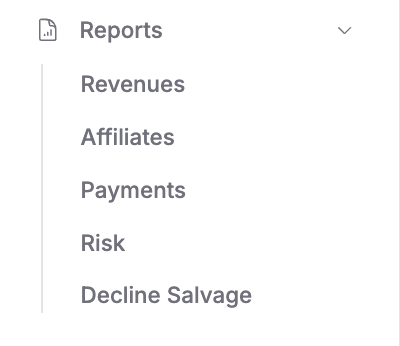 Screenshot: Reports section in the sidebar showing all available report types.
Revenue Reports
Purpose: Track financial performance and profitability.
What you’ll see:
- Gross revenue (total sales)
- Refunds (money returned to customers)
- Chargebacks (disputed transactions)
- Net revenue — gross revenue less refunds, chargebacks and tax collected (this is not profit; product cost is not deducted — see the Products report for cost of goods and margin)
- Revenue trends over time
(To compare periods, re-run the report with a different date range, or use the Date group-by tab to read period-to-period movement off one table.)
Best use cases:
- Daily revenue monitoring and goal tracking
- Monthly financial reporting for stakeholders
- Identifying revenue patterns and seasonality
- Calculating net revenue after refunds, chargebacks and tax collected
- Tax preparation and accounting
When to use it: Check daily for performance monitoring, weekly for trend analysis, monthly for financial reporting.
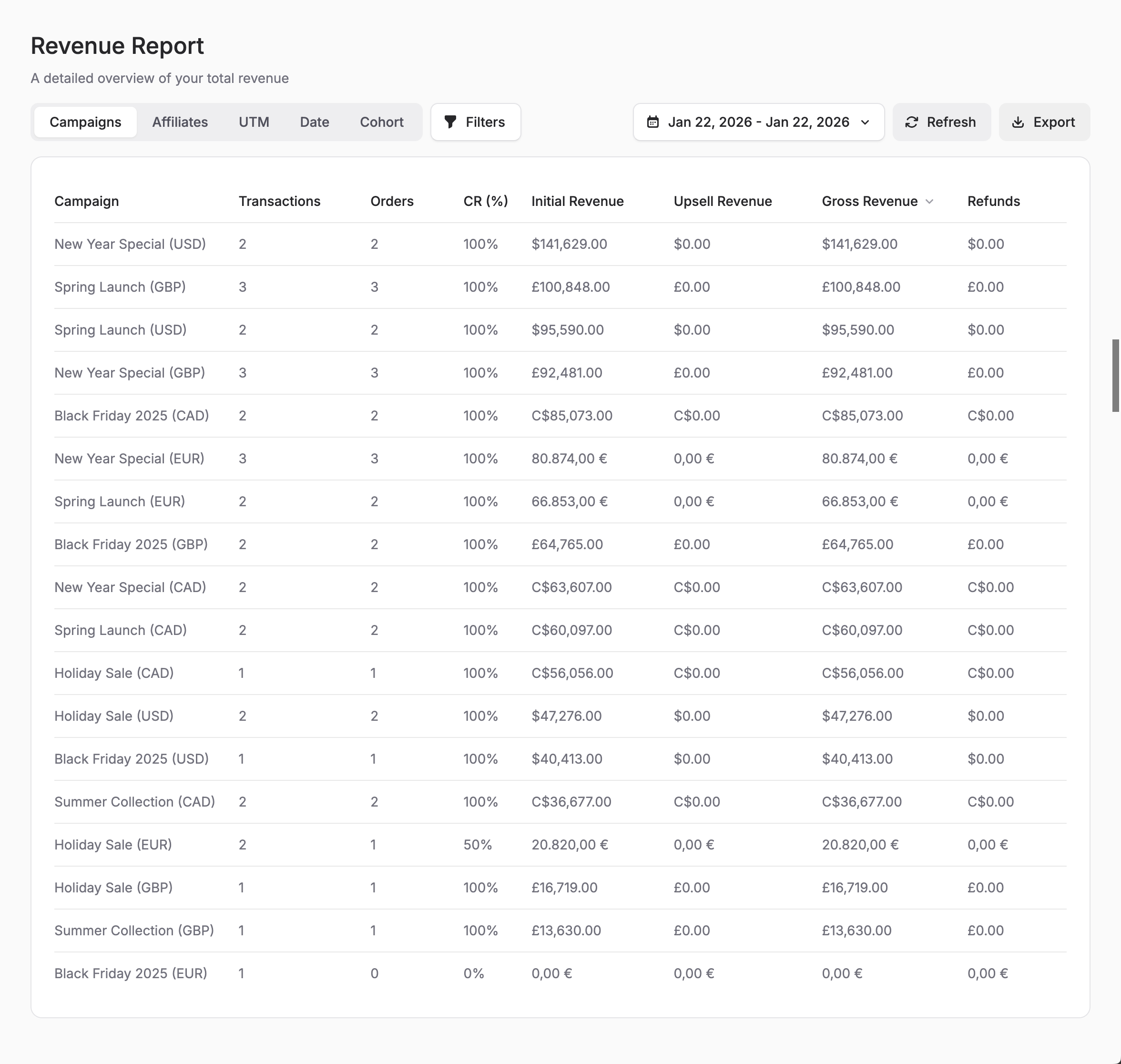 Screenshot: Revenue report showing gross revenue, refunds, chargebacks, and net revenue breakdown by campaign.
Affiliate Reports
Purpose: Measure affiliate partner performance and ROI.
What you’ll see:
- Conversions per affiliate
- Revenue attributed to each affiliate
- Conversion rate (total sales ÷ (leads + total sales)) and approval rate
- Commission calculations
- Top-performing affiliates
(Click-through rate is not available — the platform does not track affiliate clicks.)
Best use cases:
- Evaluating which affiliates drive the most revenue
- Identifying underperforming partnerships to optimize or end
- Calculating accurate commission payouts
- Recruiting decisions based on conversion data
- Optimizing affiliate program structure
When to use it: Weekly to track affiliate performance, monthly for commission payouts and partner reviews.
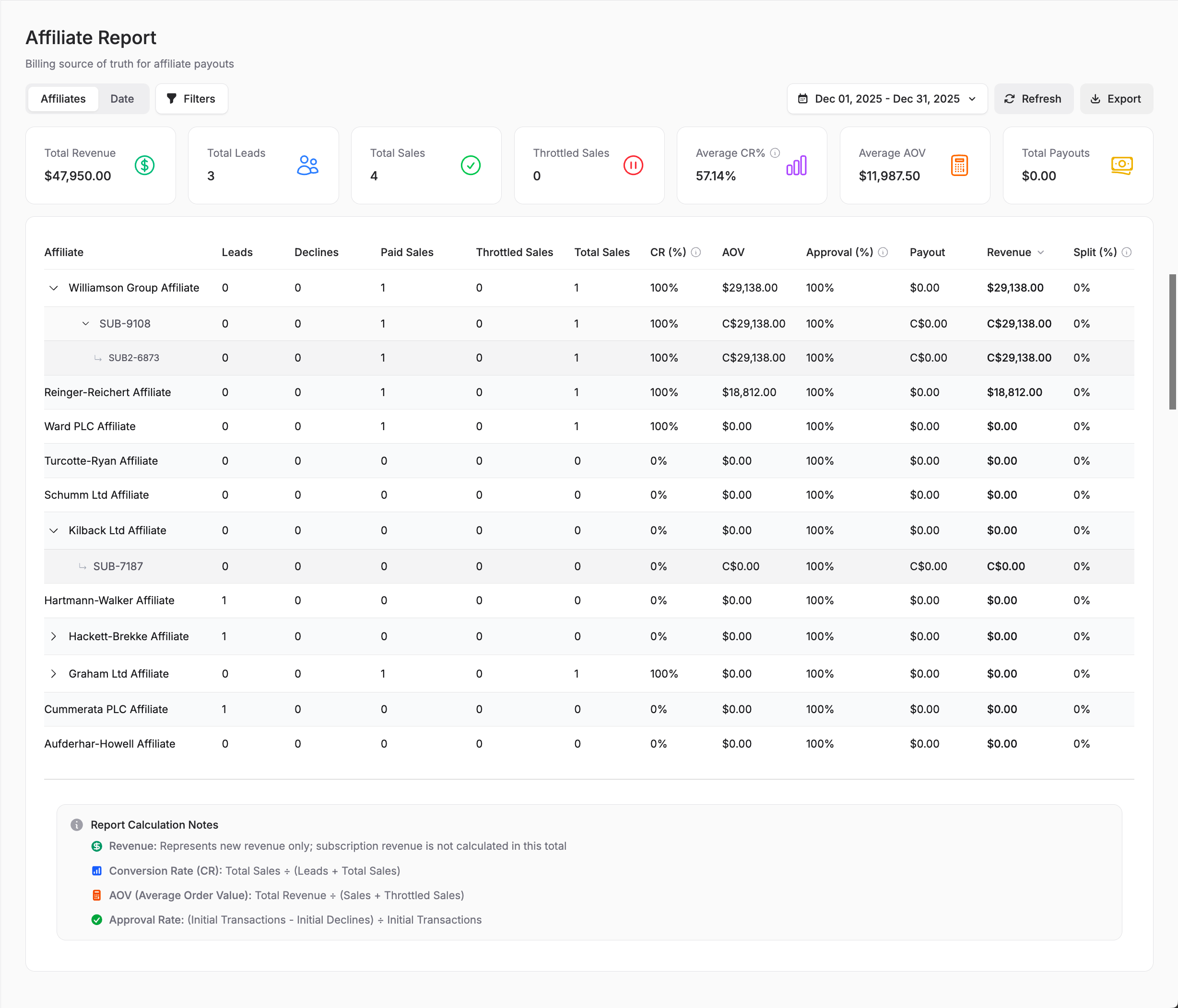 Screenshot: Affiliate performance report showing conversions, revenue, and commission data by partner.
Payment Reports
Purpose: Analyze payment gateway performance and approval rates.
What you’ll see:
- Transactions per gateway
- Approval rates by processor
- Decline counts and decline rates by gateway, orchestrator, issuer, card schema, BIN or date (individual decline reasons live in the separate Decline Reasons report)
- Gateway comparison metrics
Best use cases:
- Comparing gateway performance to choose the best processor
- Identifying gateways with high decline rates
- Optimizing payment routing strategies
- Troubleshooting payment issues
- Negotiating better rates with processors
When to use it: Weekly to monitor gateway health, monthly to evaluate switching processors or renegotiating terms.
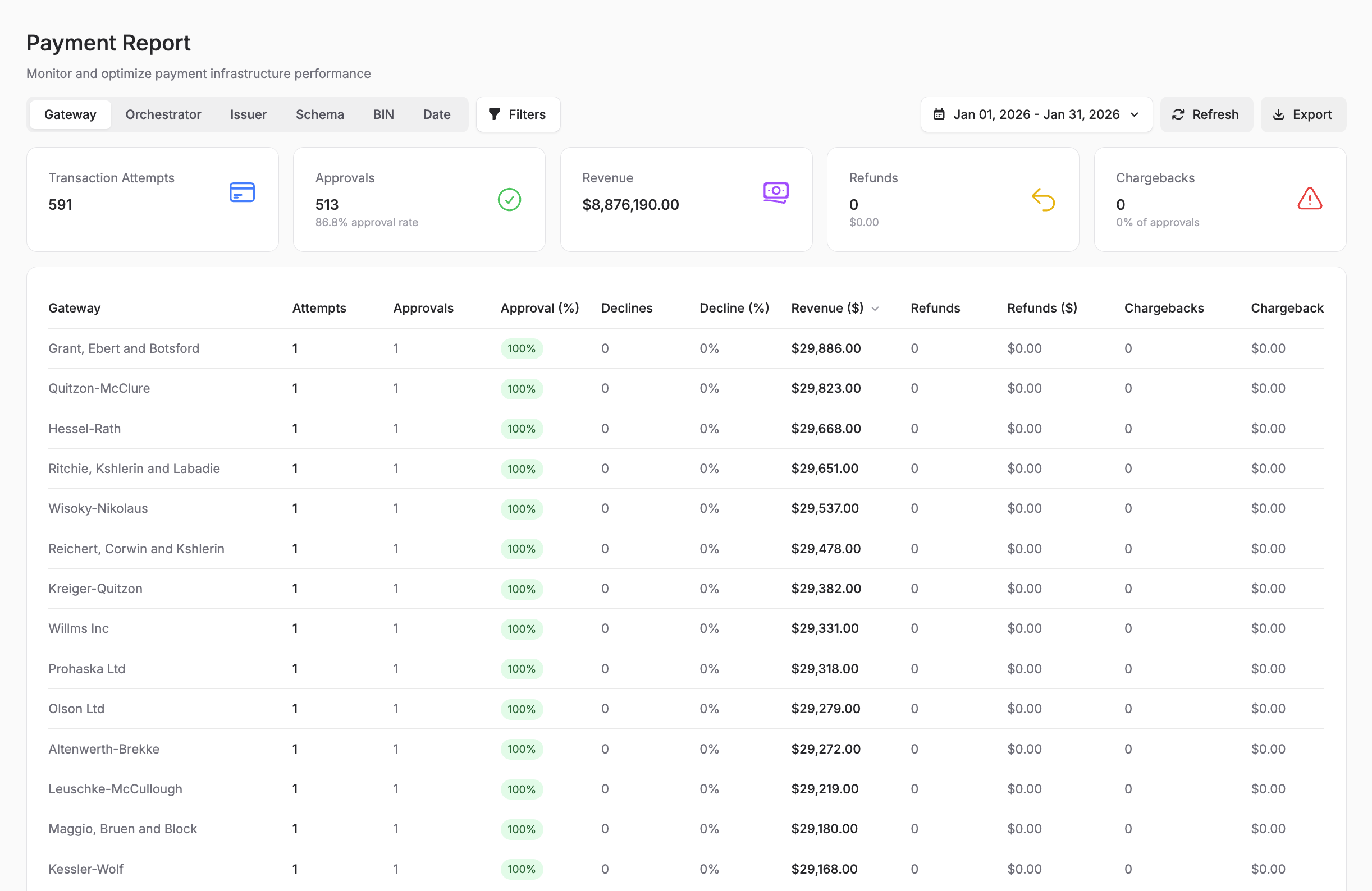 Screenshot: Payment performance report displaying approval rates, decline rates, and gateway comparison metrics.
Risk Reports
Purpose: Spot low-quality traffic sources and unusual card brand or BIN concentration.
What you’ll see:
- Transaction attempts and approvals, plus conversion rate (orders ÷ leads), by affiliate, UTM source or date
- Card brand mix and top card BINs, which you can scan for unusual concentration
(For chargeback rates use the Revenue report — CB Rate by campaign, affiliate or UTM — or the Payment report for chargeback rate by gateway. Blacklists are reviewed and managed under Settings → Customer Blacklists / BIN Blacklists.)
Best use cases:
- Identifying fraudulent traffic sources or affiliates
- Spotting affiliates or UTM sources whose approvals are low relative to transaction attempts
- Watching for unusual card brand or BIN concentration
When to use it: Daily for high-volume merchants, weekly for moderate volume. Review immediately if approval quality drops on a specific affiliate or traffic source.
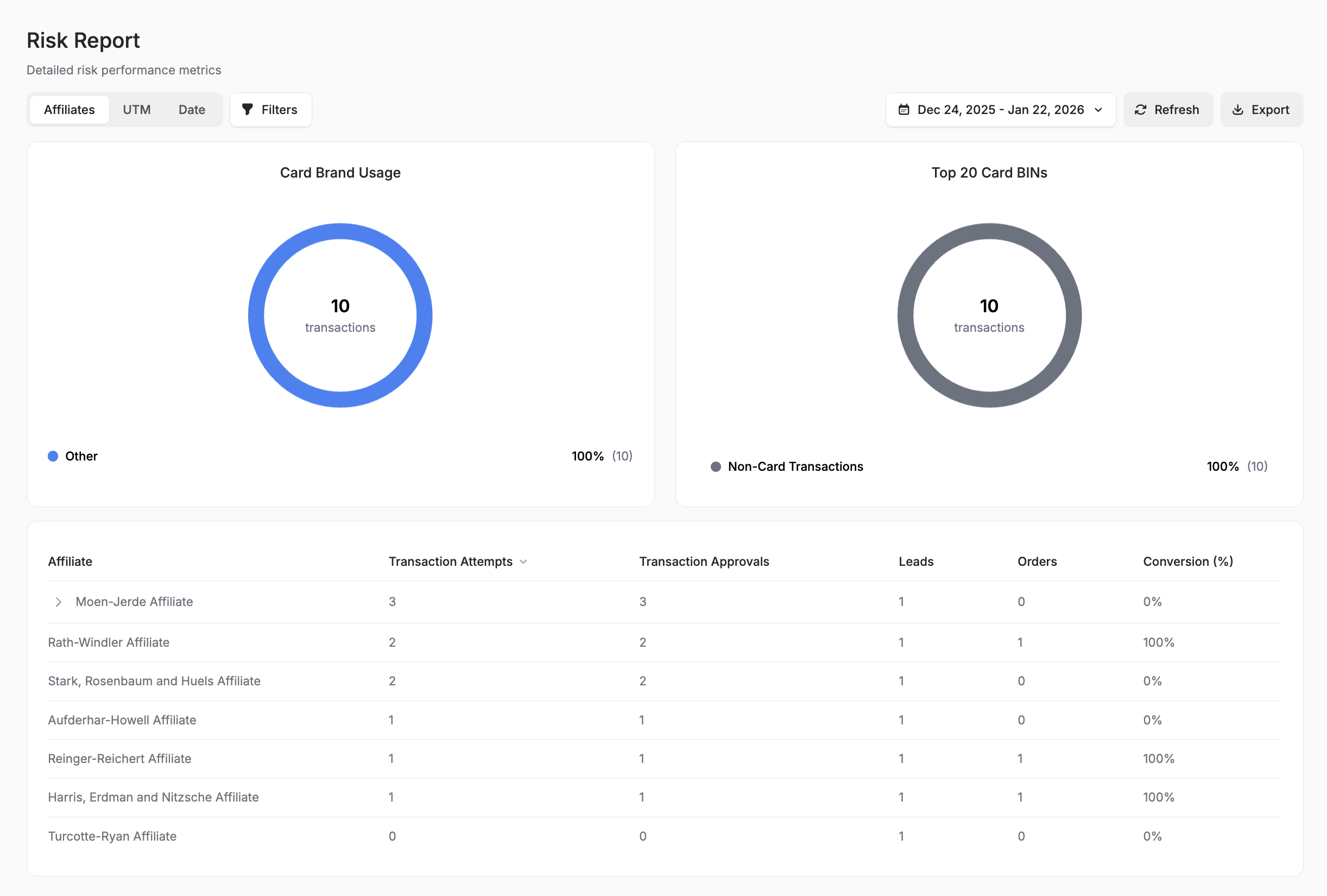 Screenshot: Risk analysis report showing card brand usage, top card BINs, and conversion metrics by affiliate.
Decline Salvage Reports
Purpose: Measure effectiveness of retry logic and payment recovery.
What you’ll see:
- Total retry attempts (the count of salvage retries, not of the original declines)
- Successful salvage attempts
- Revenue recovered through retries
- Salvage success rate by gateway
- Average revenue per successful salvage
Best use cases:
- Evaluating ROI of your decline salvage strategy
- Optimizing retry timing and rules
- Comparing salvage performance across gateways
- Calculating recovered revenue
When to use it: Weekly to optimize retry strategies, monthly to calculate recovered revenue impact.
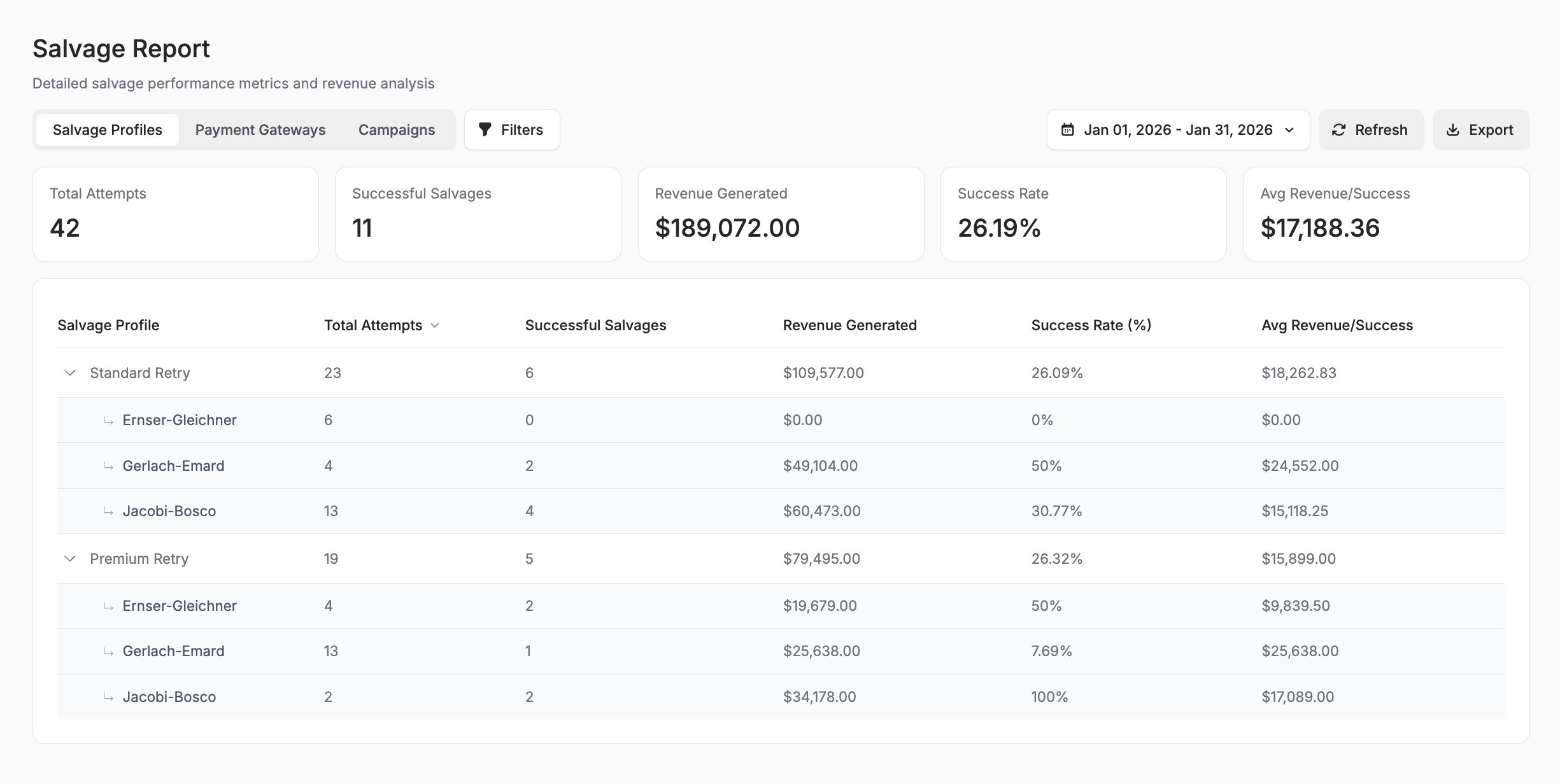 Screenshot: Decline salvage effectiveness report displaying retry attempts, successful recoveries, and revenue recaptured by salvage profile.
Using Reports Effectively
Pro tips:
- Set up a reporting schedule - Review key reports at consistent intervals (daily dashboard check, weekly deep dive, monthly comprehensive review)
- Compare time periods - Always look at week-over-week or month-over-month trends, not just absolute numbers
- Segment your data - Filter reports by product, campaign, or affiliate to identify specific issues or opportunities
- Export for deeper analysis - Use CSV exports to combine Spark CRM data with other business metrics
- Set alerts - Configure threshold alerts under Settings → Notifications for gateway and orchestrator capacity, consecutive declines and delayed shipments, plus non-threshold alerts such as unresolved disputes. Chargeback rate has no threshold alert - monitor it on the Revenue report’s CB Rate column
- Cross-reference reports - Combine insights from multiple reports (e.g., affiliate + risk reports to identify fraudulent traffic sources)
Common reporting workflows:
Daily Operations Check:
- Revenue report (quick check on daily sales, plus the CB Rate column for chargeback monitoring)
- Payment report (approval rates and payment failures to investigate)
- Risk report (approval and conversion quality by traffic source)
Weekly Performance Review:
- Revenue trends (weekly comparison)
- Affiliate performance (conversions and revenue by partner)
- Payment gateway performance (approval rates and decline analysis)
- Decline salvage effectiveness (recovery rates and revenue recaptured)
Monthly Strategic Review:
- Comprehensive revenue analysis, re-run for the prior period to compare
- Payment gateway ROI and optimization opportunities
- Traffic-quality review by affiliate and UTM source
- Affiliate program ROI calculation
- Decline salvage strategy effectiveness
How Modules Connect
Here’s how the main modules work together:
Campaign → Product → Order → Transaction → Fulfillment
    ↓
Affiliate (tracking)
    ↓
Customer (created/linked)
    ↓
Subscription (if recurring)- Campaign defines the sales flow and contains products
- Customer is created or linked when an order is placed
- Order is created with products from the campaign
- Transaction processes payment through a gateway
- Fulfillment delivers the product
- Subscription manages recurring billing (if applicable)
- Affiliate tracks attribution throughout
Next Steps
Ready to start using Spark CRM? Continue to Using the App for a step-by-step guide to your first workflow.