

Affiliate throttling allows you to automatically limit affiliate activity based on sales volume or revenue thresholds. Use throttling to manage affiliate performance, prevent fraud, and control budget exposure.
Understanding Throttling
Spark CRM offers throttling control at several levels: top-level (per affiliate), campaign-level (per campaign-affiliate pair), optional per-sub-affiliate overrides under either of those, plus caller-initiated throttling via the Checkout API.
Top-Level Throttling
Global throttling settings that apply across all campaigns for a specific affiliate. Set once and apply everywhere unless overridden at the campaign level.
Use when:
- You want consistent limits across all promotions
- Managing overall affiliate relationship
- Setting baseline fraud prevention rules
Campaign-Level Throttling
Campaign-specific throttling that overrides top-level settings for individual campaigns.
Use when:
- Testing new affiliates on specific promotions
- Running limited-time offers with different limits
- Applying stricter controls to high-risk campaigns
Caller-Initiated Throttling (API)
API callers can throttle an individual order directly by passing is_throttle: true to the Checkout API order endpoints (Create Lead, Process Payment, Create Order, Reprocess Payment). The order is throttled exactly as if Spark CRM’s own throttling had applied — affiliate pixels are skipped, no commission is recorded, and the order is excluded from the affiliate-facing My Affiliates report. A caller-initiated throttle counts toward the affiliate’s configured throttle rate rather than stacking on top of it. For Sales-type percentage throttling and for Ratio throttling, Spark CRM caps its own throttles so the daily total never exceeds the configured level. For Revenue-type throttling the caller’s throttles feed into the payout-percentage calculation, which reduces automatic throttling indirectly rather than by a hard cap. It never un-throttles an order, and when the affiliate has no throttling configured the order is simply throttled on its own. See Basic DTC Checkout Flow.
Throttling Metrics
Choose between two throttling types:
Sales-Based Throttling
Limits based on successful order volume per day (24-hour period based on the team’s timezone, falling back to the account owner’s).
Example: Threshold 100 sales, Throttle Rate 25% - once the affiliate has 100 or more successful sales today, each further order has a 25% chance of being scrubbed.
Revenue-Based Throttling
Limits based on dollar amounts per day (24-hour period based on the team’s timezone, falling back to the account owner’s).
Example: Affiliate generates $3,000 in revenue with $1,750 payout owed = a 58.33% payout percentage. With a Throttle Rate of 20%, Spark CRM raises the scrub chance above the configured 20% until the payout percentage falls back toward that target.
Configuration Parameters
Both throttling types use two key parameters:
Min. Threshold
The minimum amount (sales count or revenue dollars) before throttling activates.
- Sales Type: Number of successful orders (e.g., 100 orders). Upsells and retries on the same order do not add to the count.
- Revenue Type: Dollar amount (e.g., $1,000)
Throttle Rate
The percentage of the affiliate’s orders that will be scrubbed once the threshold is met. A 25% rate means roughly 1 in 4 orders is throttled (no pixel, no commission).
- Set to 0% to disable throttling under the Percentage algorithm (the Ratio algorithm ignores this field)
- Typically range: 5% - 50%
- Higher percentages = stricter limits (more orders scrubbed); 0% throttles nothing
Scrub Algorithm
Choose how throttled orders are picked from the affiliate’s traffic.
Percentage (Default)
Random. Each order has an independent chance of being scrubbed equal to the throttle rate (e.g. 25% rate = each order has a 1-in-4 shot of being scrubbed). Smooth on average over time; exact daily counts vary.
Use when: managing payout exposure across high-volume affiliates and exact counts don’t matter.
Ratio
Exact. Enter N and the system scrubs 1 order after every N orders that pass — so 1 in every N+1 orders is scrubbed.
Example: Ratio = 4 → orders 1, 2, 3, 4 pass; order 5 is scrubbed. The cycle restarts.
Use when: you need a predictable, exact scrub pattern (e.g. capping payouts at a known ratio).
Important behavior in Ratio mode
- The cycle is anchored to today’s successful sales (status PROCESSING or COMPLETED) for this affiliate, scoped by campaign when applicable.
- Leads, declines, and abandoned carts do not count — only sales that actually transacted.
- The cycle resets naturally at midnight in the team’s timezone (falling back to the account owner’s) because the count is scoped to today.
- Throttle Type (Revenue / Sales) is ignored — Ratio always counts sales, not dollars.
- Min. Threshold still applies — throttling stays off until the affiliate has at least the threshold number of successful sales today.
Where to set it
Same place as your other throttle settings — either Top-Level (Affiliates page) or Campaign-Level (Campaigns → Affiliates tab). Open the throttle modal, tick Enable Throttling (on a campaign it reads Enable Campaign-Specific Throttling), then pick Throttle Algorithm: Percentage (%) or Ratio (scrub 1 sale after X orders). The Scrub Ratio input appears when Ratio is selected.
Configuring Top-Level Throttling
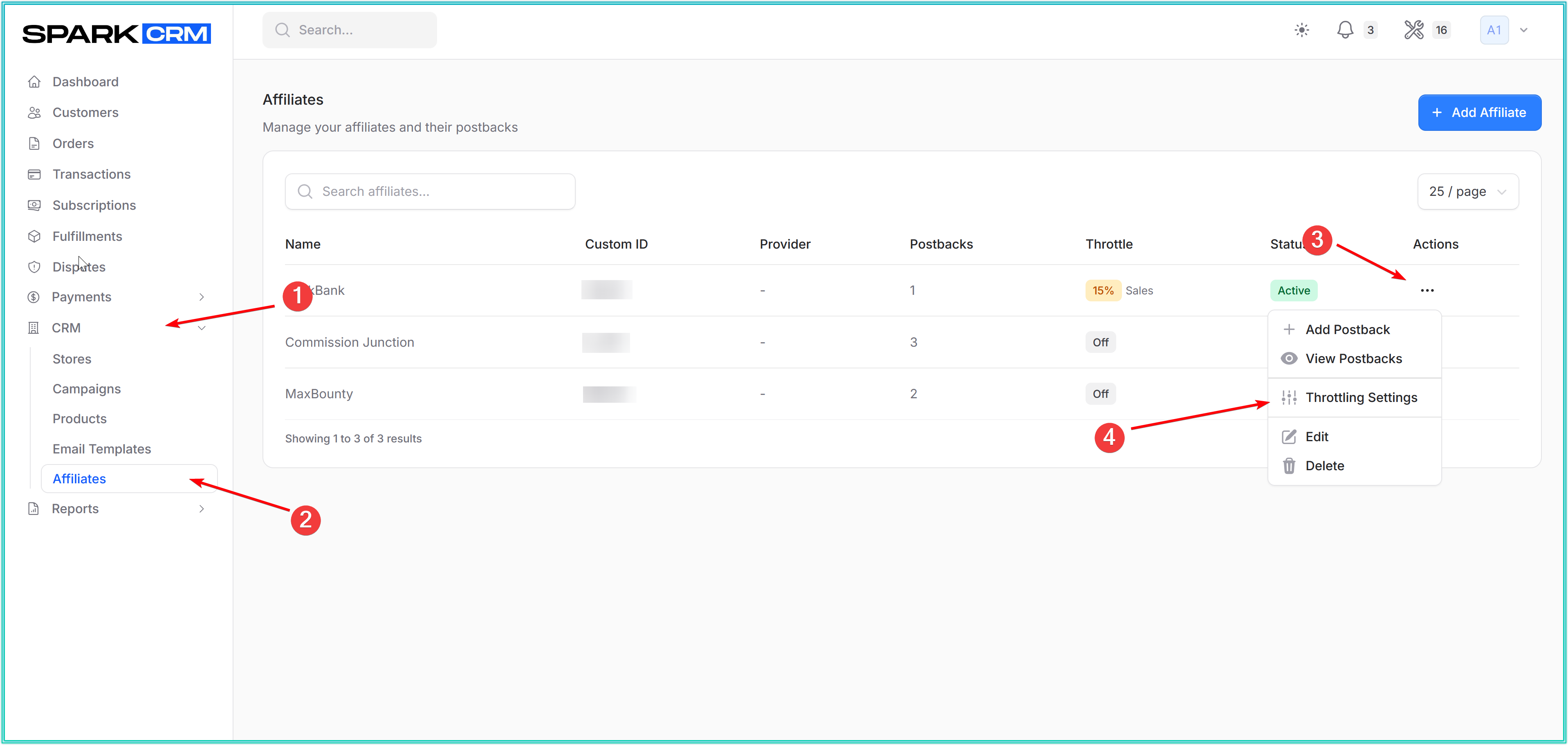
Navigation Path:
- Go to CRM → Affiliates
- Locate the affiliate in the list
- Click the three-dots menu (⋮) next to the affiliate
- Select Throttling Settings
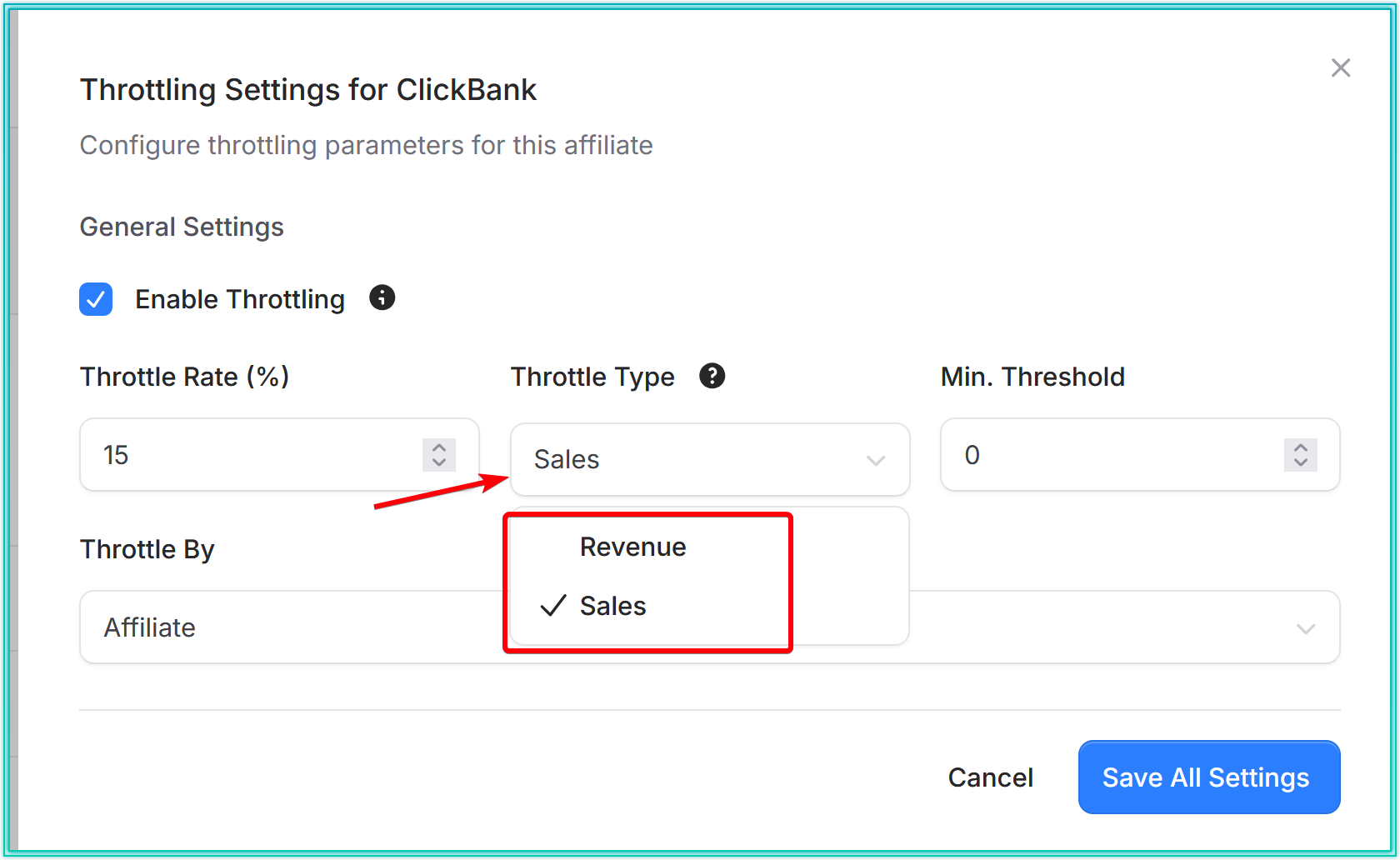
Configuration Steps:
- Choose throttling type: Revenue or Sales
- Enter Min. Threshold (when throttling starts)
- Enter Throttle Rate (the percentage of orders that will be scrubbed)
- Click Save All Settings (on a campaign the button reads Save Campaign Settings)
Throttling Calculation Examples
Revenue Type - Flat Rate Affiliate
Scenario:
- Affiliate earns: $50 per order (flat rate)
- Threshold: $1,000
- Current stats: $3,000 revenue, $300 payout owed
Calculation:
Current payout percentage = ($1,750 / $3,000) × 100 = 58.33%Throttle Rate = 20% -> because the affiliate is currently paying out 58.33%, Spark CRM raises the scrub chance by the maximum +/-20-point adjustment to 40%, so roughly 4 in 10 further orders are scrubbed until the payout percentage falls back toward the 20% target.
Revenue Type - Percentage-Based Affiliate
Scenario:
- Affiliate earns: 10% per order
- Threshold: $1,000
- Current stats: $3,000 revenue, $300 payout owed
Calculation:
Current payout percentage = payout / gross revenue x 100
Difference = current payout % - Throttle Rate  (capped at +/-20 points)
Effective scrub chance = Throttle Rate + that capped difference  (clamped 0-100)
With a Throttle Rate of 5% and the numbers above: the affiliate is paying out $300 on $3,000, so the current payout percentage is 10%. 10% - 5% = 5 points, which is inside the +/-20-point cap, so the effective scrub chance becomes 5% + 5% = 10%. The affiliate’s own commission rate is never part of the throttling math - only the payout it produces.
Sales Type
Scenario:
- Threshold: 100 orders
- Current stats: 250 successful orders today for this affiliate
- Throttle Rate: 25%
Calculation: the affiliate’s own successful orders today (250) - scoped to this campaign when the order carries one - are compared to the 100-order threshold; once past it, each further order has a 25% chance of being scrubbed. Team-wide sales are not part of the calculation.
Configuring Campaign-Level Throttling
Campaign-level throttling overrides top-level settings for specific campaigns.
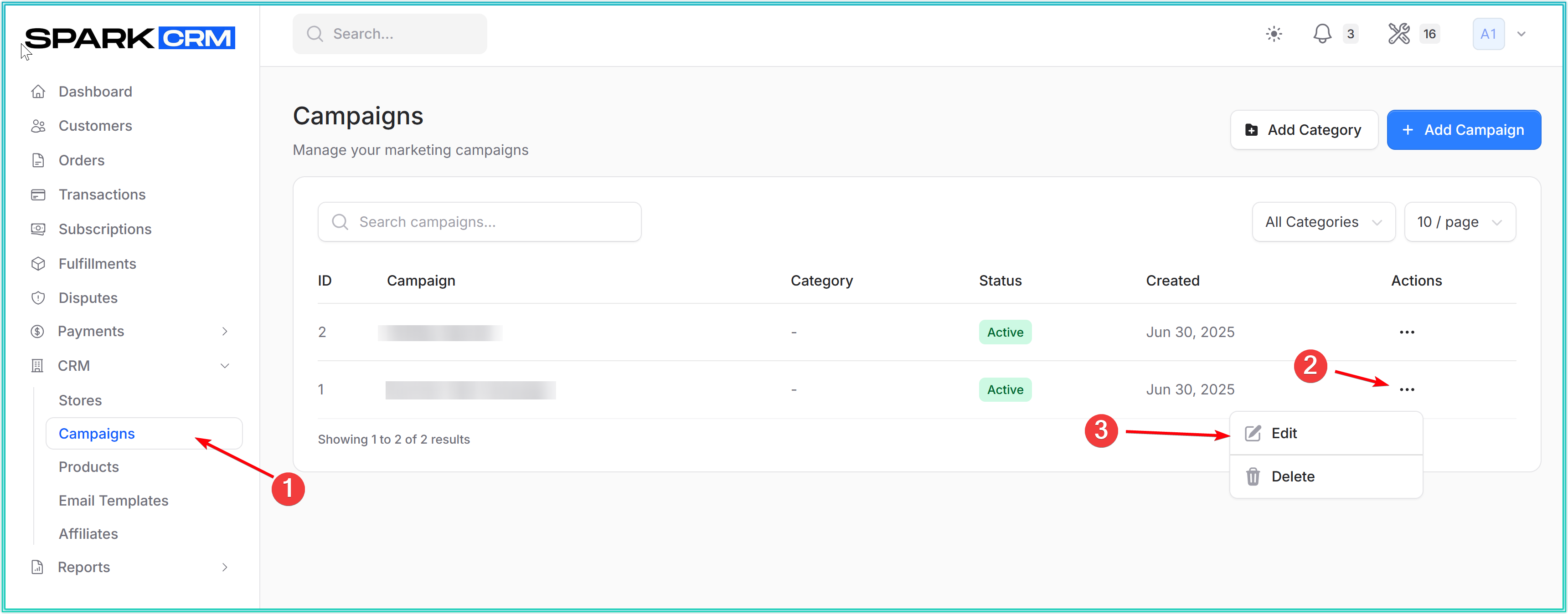
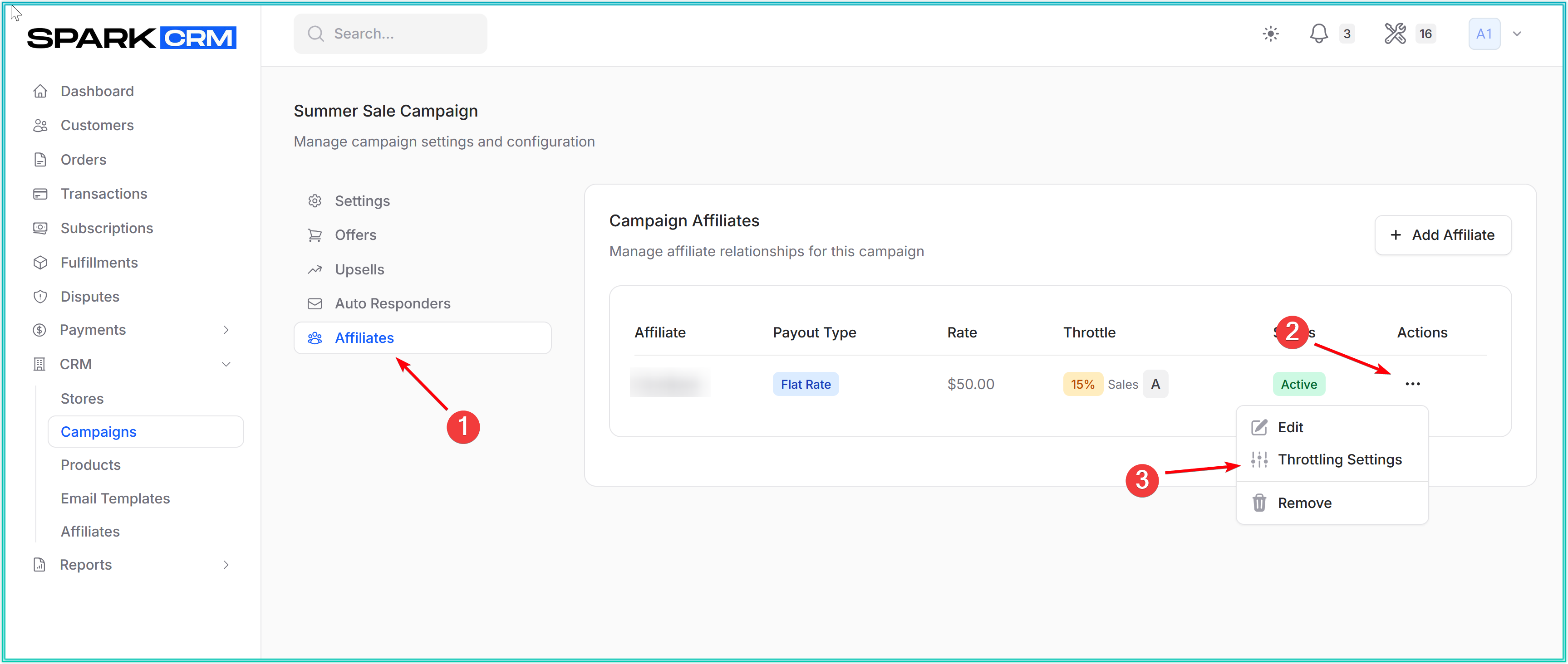
Navigation Path:
- Go to CRM → Campaigns
- Select the campaign
- Go to Affiliates tab
- Find the affiliate in the list
- Click the three-dots menu (⋮)
- Select Throttling Settings
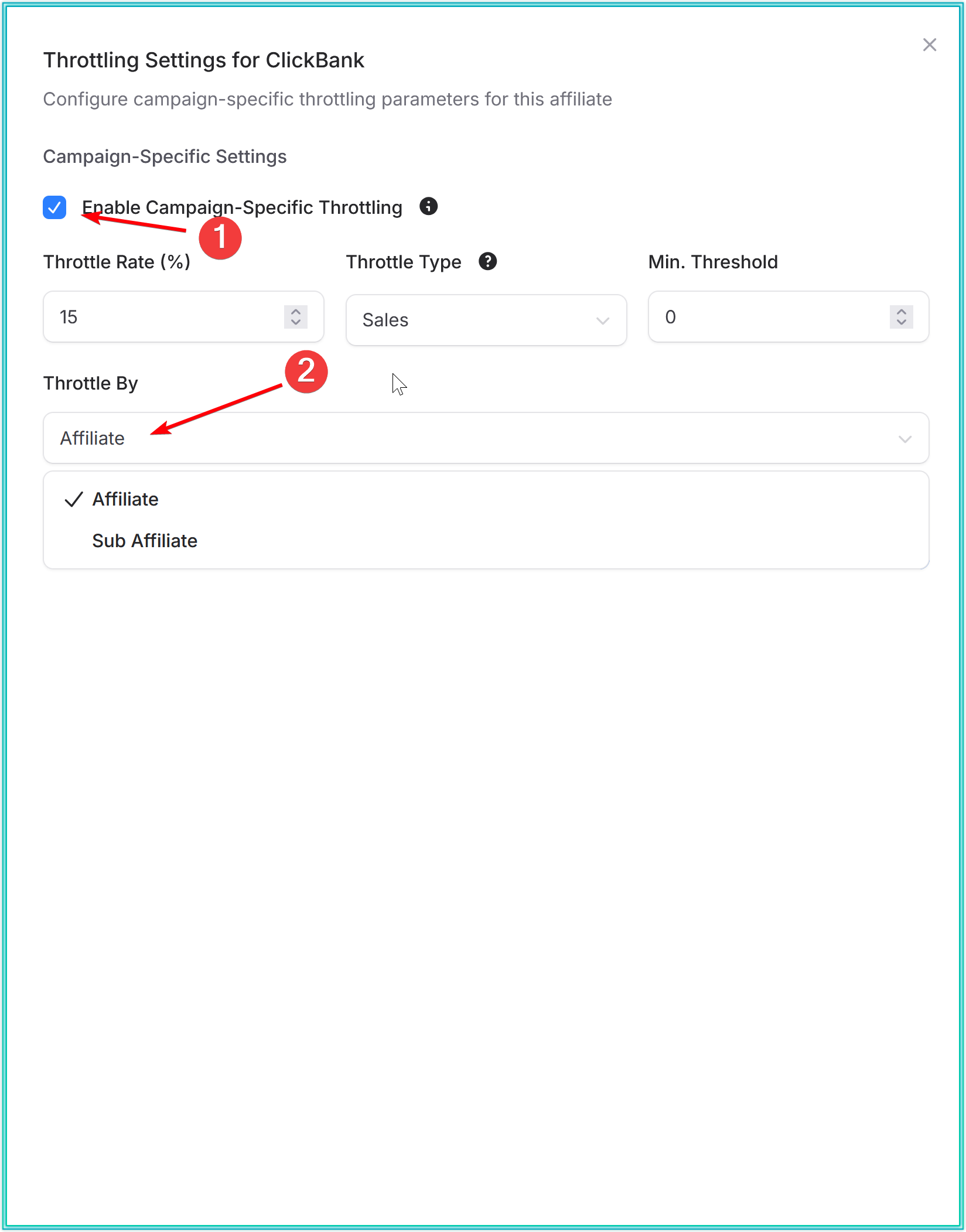
Configuration Steps:
- Tick Enable Campaign-Specific Throttling
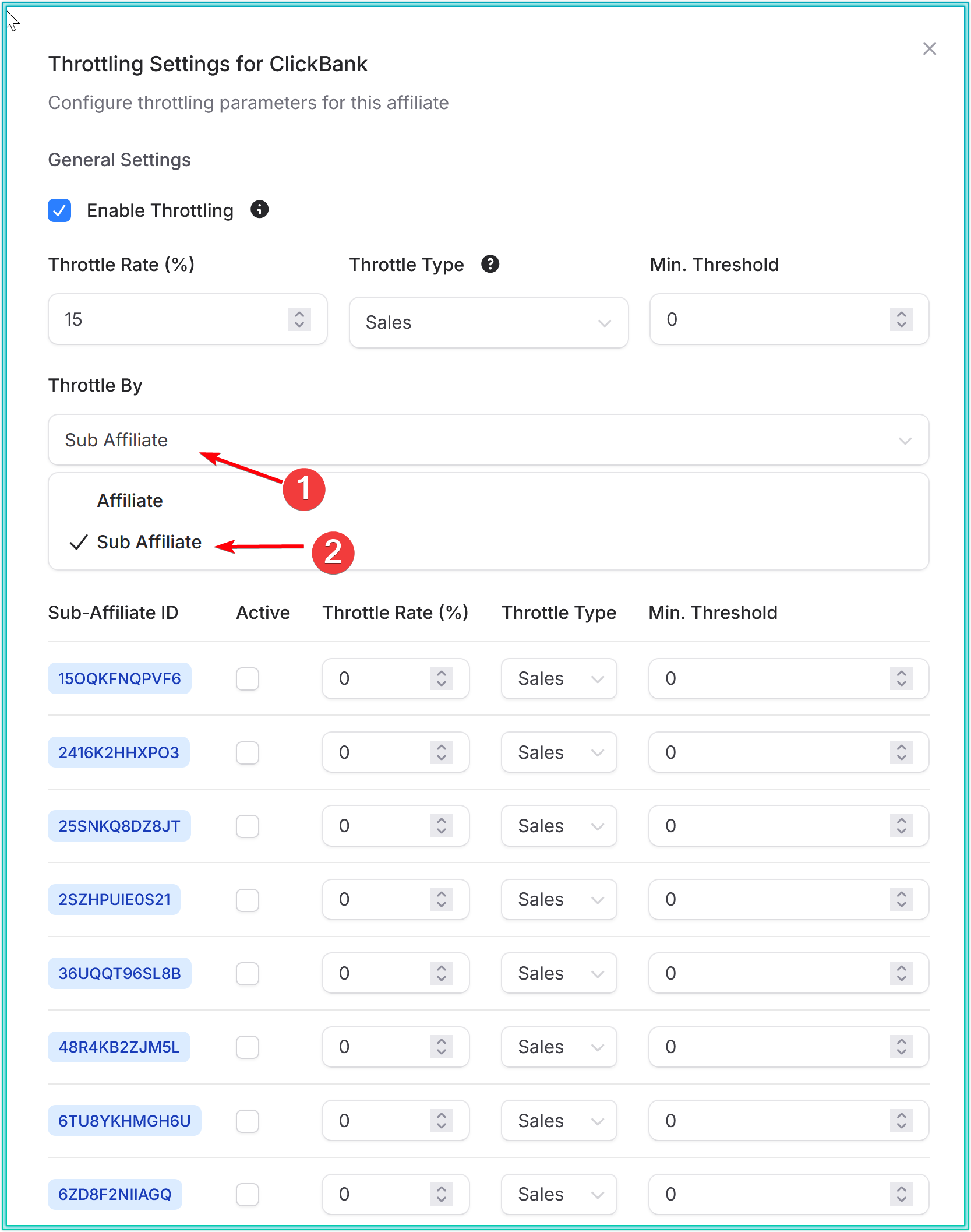
- Set Throttle By: Affiliate or Sub Affiliate (choosing Sub Affiliate reveals a per-sub-affiliate settings table).
- Choose throttling type: Revenue or Sales
- Enter Min. Threshold
- Enter Throttle Rate
- Click Save Campaign Settings
Managing Throttling Overrides
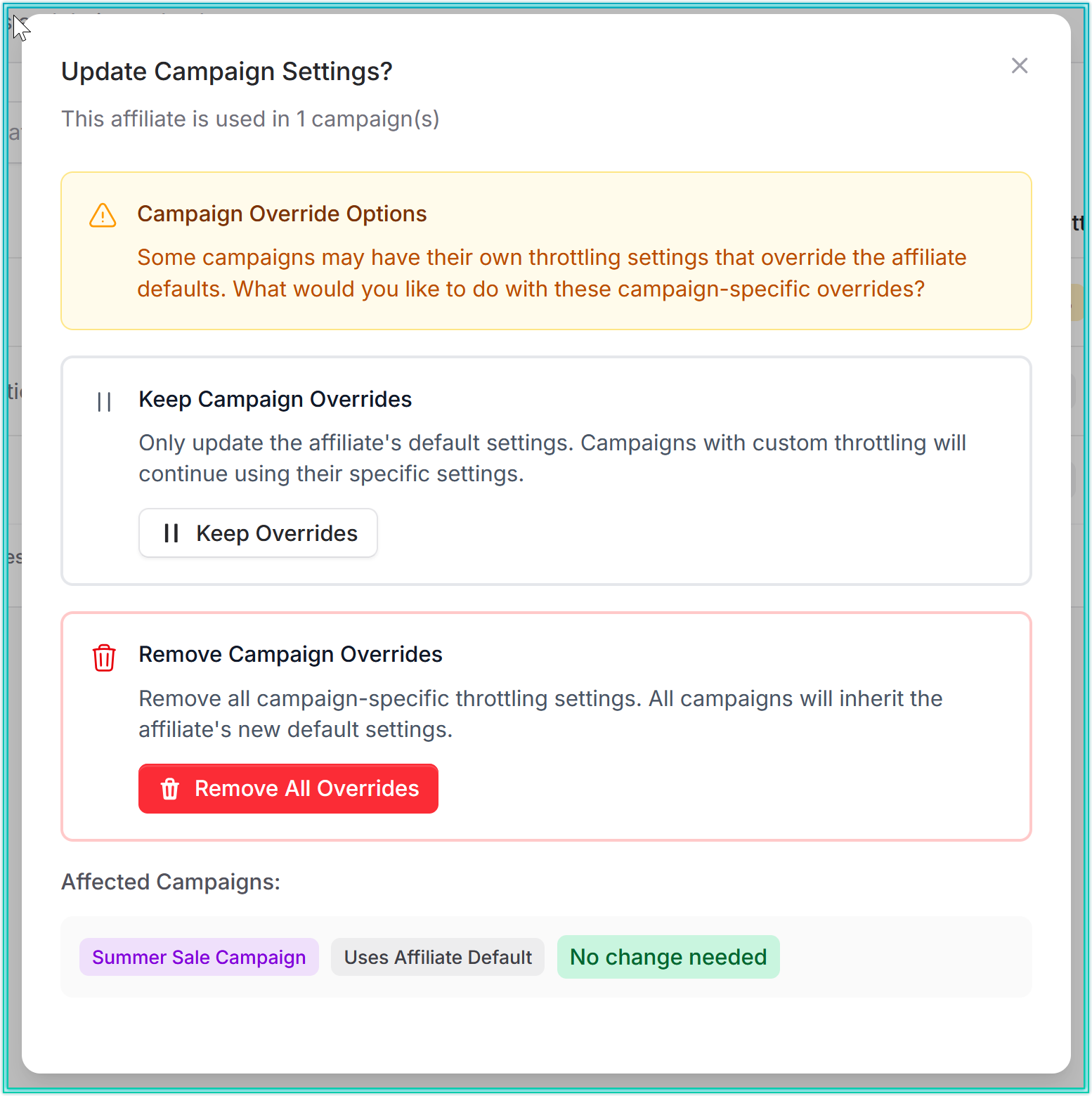
When you save top-level throttling settings for an affiliate that is attached to any campaign, Spark CRM shows the Update Campaign Settings? modal listing the affected campaigns.
Override Options:
Keep Campaign Overrides
- Keeps existing campaign-specific settings intact
- Only affects campaigns without overrides
- Preserves your custom campaign configurations
Remove Campaign Overrides (button: Remove All Overrides)
- Deletes all campaign-level throttling for this affiliate
- Applies new top-level settings everywhere
- Cannot be undone - use with caution
Important Considerations
Timezone Behavior
- The 24-hour throttling window is based on the team’s timezone, falling back to the account owner’s if the team has none
- All throttling calculations reset at midnight (account owner’s time)
- Ensure timezone is correctly configured in account settings
Throttle Rate = 0%
- Setting Throttle Rate to 0% disables throttling when the algorithm is Percentage. Under the Ratio algorithm the rate is ignored - to stop throttling there, untick Enable Throttling.
- Use this to temporarily turn off limits without deleting configuration
Override Precedence
- Campaign-level settings override top-level settings whenever Enable Campaign-Specific Throttling is ticked on that campaign. If the toggle is off, the campaign falls back to the affiliate’s top-level settings even though an override row exists.
- An affiliate can have different throttling rules per campaign
- Review campaign overrides before changing top-level settings
Testing Considerations
- Test orders are excluded from throttling unless your environment enables
THROTTLE_TEST_ORDERS, so throttling cannot be exercised with test cards by default - validate the configuration on low-volume live traffic instead.
Monitoring Throttled Activity
Where to View Throttling Impact
Orders Page:
- Throttled orders are marked in the order list
- Filter by throttle status to see the affected orders
Reports:
- Affiliate Reports - show throttled sales counts (excluded from payout) alongside conversion and approval rates
- Orders Page - use the Only show throttled orders filter to see exactly which orders were scrubbed (the Revenues report has no throttling dimension)
Affiliates page: the Throttle column shows each affiliate’s current rate (or ratio), throttle type, and whether throttling is active. Threshold progress is not displayed anywhere; the nearest proxy is the affiliate’s sales for today in the Affiliates report.
Troubleshooting Throttling Issues
Problem: Throttling not activating
- Verify threshold is set correctly (not too high)
- Percentage algorithm: check that Throttle Rate is > 0%. Ratio algorithm: check that Scrub Ratio is at least 1.
- Confirm the affiliate has reached (met or passed) the threshold since midnight in the team’s timezone (falling back to the account owner’s)
- Verify timezone settings
Problem: Too aggressive throttling
- Review Min. Threshold - may be set too low
- Lower the Throttle Rate (or raise the Scrub Ratio) to throttle fewer orders
- Consider using campaign-level overrides for specific promotions
Problem: Campaign overrides not working
- Ensure the “Enable Campaign-Specific Throttling” toggle is ticked
- Verify campaign override was saved successfully
- Confirm the campaign-affiliate pairing still exists on the campaign’s Affiliates tab (the override is stored per campaign-affiliate pair)
Best Practices
Starting Out
- Start conservative - Set higher thresholds initially
- Monitor for 30 days before adjusting
- Document your rules - Share throttling policies with team members
Fraud Prevention
- Use Sales-based throttling to catch volume fraud
- Set aggressive throttle rates (25-50%, so a quarter to half of orders are scrubbed) for high-risk affiliates
- Combine with other fraud tools (blacklists, validation services)
Affiliate Management
- Communicate throttling policies to affiliates upfront
- Review throttling quarterly based on performance
- Use campaign-level throttling for promotional periods
Budget Control
- Use Revenue-based throttling to manage payout exposure
- Set thresholds aligned with monthly budget caps
- Monitor reports weekly during high-volume periods
Testing New Affiliates
- Start with stricter campaign-level throttling (low threshold, high rate)
- Gradually relax limits as trust builds
- Move to top-level throttling after proven performance
Related Features
- Affiliate Management - Learn about affiliate setup and tracking in Core Concepts
- Campaigns - Understand campaign configuration in Core Concepts
- Reports - View affiliate performance metrics in Reports section
- Risk Management - Combine with blacklists and validation tools for comprehensive fraud prevention
Questions or Need Help?
Contact support@sparkcrm.io for assistance with throttling configuration or questions about advanced affiliate management.